
How to Apply for Aadhar Card

Aadhaar is a 12-digit number that is issued by UIDAI to residents of India. In order to
qualify for an Aadhaar number, you have to complete multiple checks and data validation.
These checks will be done when you apply for your card.
qualify for an Aadhaar number, you have to complete multiple checks and data validation.
These checks will be done when you apply for your card.
Applying for Aadhaar is free. Here are the steps you need to follow to successfully apply
for and get your 12-digit number and card:
for and get your 12-digit number and card:
Step 1: Locate an Aadhaar Enrolment Centre
Whether you’re applying for the card for yourself or a member of your family,
you will have to visit an Aadhaar Enrolment Centre. Enrolment is done free of cost.
You can get enrolled at any enrolment centre close to you.
you will have to visit an Aadhaar Enrolment Centre. Enrolment is done free of cost.
You can get enrolled at any enrolment centre close to you.
Finding an Authorised Aadhaar Enrolment Centre
You can search for an enrolment centre close to you by visiting the UIDAI website
and selecting and entering information by:
and selecting and entering information by:
Once you enter details in the required fields, you will get addresses to centres close to you.
You will also, get information on these centres including if they are temporary/permanent,
how many enrolments and updates have been completed in the last 30 days, and
when the information was last updated.
You will also, get information on these centres including if they are temporary/permanent,
how many enrolments and updates have been completed in the last 30 days, and
when the information was last updated.
Step 2: Visit an Enrolment Centre with Supporting
Documents
Once you choose your enrolment centre, you will need to visit the centre along with
certain documents.
These are:
certain documents.
These are:
- Identity proof documents – PAN Card, Passport, Voter ID, Driving Licence, etc.
- Address proof documents – Water/Electricity/Gas Bill, PAN Card, Passport, etc.
- In case you don’t have any individual valid document – family entitlement
a document containing your details head of the family should
be enrolled for Aadhaar in this case. - If you don’t satisfy any of the above criteria, you can seek help from an
Introducer at the enrolment centre who is appointed by the Registrar and has a
valid Aadhaar number.
Step 3: Enrolling for Aadhaar
Once you visit the centre with the necessary documents, here are the steps that
you need to complete:
you need to complete:
- Fill the enrolment form available at the centre with your personal details.
- Capturing demographic data – your name, DOB, address, gender, and
a mobile number has to be mandatorily provided. You may also provide your
email address, but this is optional. - Biometrics information – Your photograph (only face) will be taken at the
centre along with your fingerprints (all 10 fingers) and a scan of your irises. - Children below the age of 5 – Parent’s/guardian’s name, Aadhaar, and
biometrics to be provided. - Review all the details provided, make any corrections if needed during
the review process and complete enrolment. - You will receive an acknowledgement slip containing your enrolment number
and other details that were collected.
Making Corrections to Information Provided During
Enrolment
During the enrolment process, you can review all the details provided and make any
changes/corrections on-spot, if needed. However, if you need to make any
corrections after you have already enrolled, you will have 96 hours post
enrolment to visit the centre, provide the acknowledgement slip and make
changes to any information you previously provided.
changes/corrections on-spot, if needed. However, if you need to make any
corrections after you have already enrolled, you will have 96 hours post
enrolment to visit the centre, provide the acknowledgement slip and make
changes to any information you previously provided.
Checking Aadhaar Status
You can check the status of your Aadhaar in case you have enrolled for
it at an Enrolment Centre. You will need your Enrolment ID or EID in order
to check your status. Your EID can be found on top of the acknowledgement
slip you received after you enrolled.
it at an Enrolment Centre. You will need your Enrolment ID or EID in order
to check your status. Your EID can be found on top of the acknowledgement
slip you received after you enrolled.
EID is a 28-digit number comprising two parts:
- 14-digit enrolment number in the format 012/01234/012345 and
- 14-digit date and time of enrolment in the format dd/mm/yyyy hh:mm:ss
However, to check your status, you only need the 14-digit enrolment number.
Providing the remaining 14 digits are optional.
Providing the remaining 14 digits are optional.
If you have your EID number, you can check your status by visiting
the Check Aadhaar Status webpage on the UIDAI website.
Retrieving Lost/Forgotten EID
the Check Aadhaar Status webpage on the UIDAI website.
Retrieving Lost/Forgotten EID
In case you have lost or forgotten your EID, you can retrieve it by visiting the
Retrieve Lost or Forgotten EID/UID webpage on the UIDAI website.
Retrieve Lost or Forgotten EID/UID webpage on the UIDAI website.

It takes around 60 to 90 days to get your Aadhaar card after your data has been collected
and uploaded to the Central Identities Data Repository (CIDR).
and uploaded to the Central Identities Data Repository (CIDR).
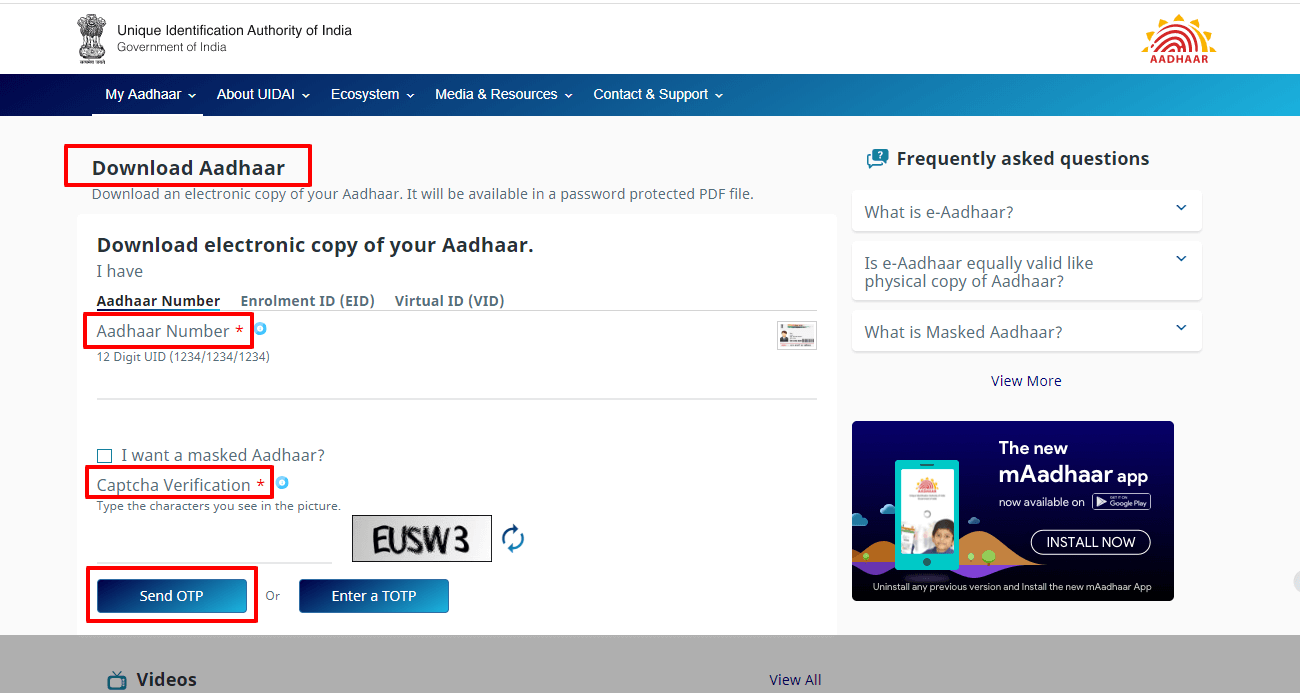
Downloading Aadhaar Card
You can get an electronic copy of your Aadhaar using your EID. Visit the
https://eaadhaar.uidai.gov.in/" Download Aadhaar webpage on the UIDAI website to
download your copy. You will receive your card as a PDF file and it
will be password-protected.
https://eaadhaar.uidai.gov.in/" Download Aadhaar webpage on the UIDAI website to
download your copy. You will receive your card as a PDF file and it
will be password-protected.
Aadhaar Reprint
In case you have lost your Aadhaar card, you can make use of the “Aadhaar Reprint”
service. You can order the reprint by paying a fee of Rs.50 (including GST).
service. You can order the reprint by paying a fee of Rs.50 (including GST).
You will need your Aadhaar number or VID (Virtual Identification Number)
to request a reprint of your card.
to request a reprint of your card.
Do not apply or enrol for Aadhaar again if you have lost/misplaced your card or details.
Enrolment should only be done once. If you apply more than once, your application will
get rejected (unless specifically advised by UIDAI).
Enrolment should only be done once. If you apply more than once, your application will
get rejected (unless specifically advised by UIDAI).
FAQs
- Can I apply for Aadhaar online or by post?
- Can NRIs apply for Aadhaar?
- Is there an age limit to apply for Aadhaar?
- What details will be captured during the enrolment process
- Demographics details – Name, date of birth, gender, and address. Providing your
mobile number and e-mail ID is optional. - Biometrics – Photograph, all 10 fingers, both irises.
- In case I do not have all my fingers or both my irises, can I still enrol?
- Will the operator charge for any fee for Aadhaar enrollment?
No. You will have to visit an Enrolment Centre to apply for Aadhaar.
This is because your biometrics need to be captured for a successful application.
This is because your biometrics need to be captured for a successful application.
Yes. NRIs are eligible to apply for Aadhaar if they have resided in India for a period
of 182 days or more in the last 12 months before applying.
of 182 days or more in the last 12 months before applying.
No. There is no age restriction to apply. Even new-born babies are eligible to get an
Aadhaar number.
Aadhaar number.
Two types of details will be captured during the enrolment process, namely:
Yes. The software used for Aadhaar has provision to handle cases wherein you do
not have all your fingers/irises.
not have all your fingers/irises.
No, the operator will not charge any fee as Aadhaar enrollment is free for
Indian residents.
Indian residents.
please refer the link(s) provided above or visit https://uidai.gov.in/.
Thanks!


No comments:
Post a Comment